Agent Skills: The AI World's App Store Is Taking Shape
170K+ open-source Skills, the missing Gateway layer, and why the Agent platform is following the Windows playbook.
In our first two posts, we went deep on OpenClaw — what it is, how its Brain-Body-Soul architecture works, and the security lessons from 1,100 exposed Gateway ports.
But there’s one thing we kept mentioning without fully explaining: Skills.
OpenClaw ships with 100+ built-in Skills. Anthropic turned Skills into an open standard. SkillsMP already hosts over 170,000 open-source Skills.
Those numbers raise a bigger question:
What exactly are Skills? How do they relate to MCP? And is this really the AI world’s “App Store moment”?
Let’s sort this out.
I. The Basic Problem Skills Solve
When you ask ChatGPT to do something, how does it approach the task?
It improvises based on its training data. If you’re lucky, the output is decent. If you’re not, it’s confidently wrong — because it doesn’t know your specific context, your industry conventions, or your workflows.
Skills exist to fix this.
A Skill is an instruction manual that tells the Agent: when you encounter this type of task, follow these steps, use these tools, and watch out for these edge cases.
Instead of improvising, the Agent follows a recipe.
II. What Does a Skill Actually Look Like?
This might surprise you: a Skill is just a folder with a Markdown file inside.
The file is called SKILL.md. It starts with a few lines of YAML metadata — name, description, license, author. Then the body is written in plain Markdown — step-by-step instructions, input/output examples, how to handle common pitfalls.
If needed, the folder can also contain scripts (say, a Python file), reference docs, and template files.
That’s it. No SDK to install. No server to spin up. No JSON-RPC protocol to implement.
Folder = skill. Markdown = interface.
This is exactly why the ecosystem is growing so fast — the barrier to creating a Skill is absurdly low. If you can write Markdown, you can write a Skill.
III. Who’s Using Skills?
Anthropic originally published Skills as an open standard at agentskills.io. But it’s not an Anthropic-exclusive format — the compatibility list has gotten wide:
- Claude Code — Anthropic’s own coding agent; Skills are the core extension mechanism
- OpenAI Codex CLI / ChatGPT — OpenAI adopted the same standard; Skills now work across both Anthropic and OpenAI ecosystems
- Cursor — one of the hottest AI coding tools; native Skills discovery and loading
- GitHub Copilot — Microsoft’s ecosystem; already compatible
- Windsurf — Cognition’s AI development environment
- OpenClaw — the project we’ve been dissecting; 100+ built-in Skills
Write a Skill once, and it works across all of them. Anthropic and OpenAI backing the same open format is almost unprecedented — these two companies agree on very little. That alone tells you how strong the convergence pressure is. A year ago every platform had its own plugin format. Now there’s a shared standard.
IV. Skills vs MCP: Stop Confusing Them
This question comes up constantly. Let’s put it to rest.
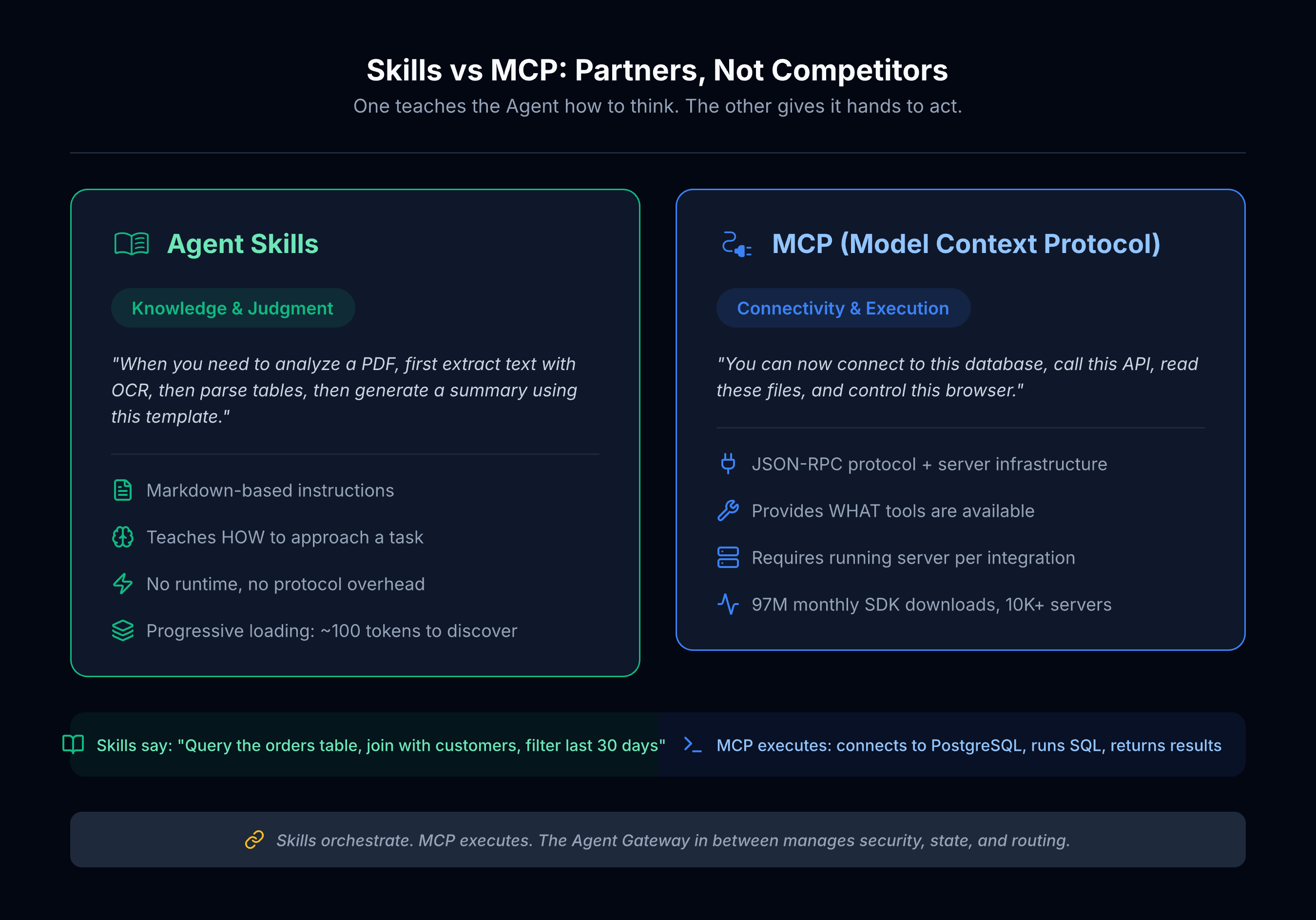
MCP (Model Context Protocol) is the protocol that lets AI models call external tools and APIs. Think of it as a universal power strip — through MCP, the Agent plugs into databases, browsers, Slack, your filesystem, whatever.
How big is MCP right now? 97 million monthly SDK downloads. Over 10,000 active servers. Donated to the Linux Foundation last December, it’s now an industry standard.
Agent Skills are the instruction manuals that tell the Agent how to use those tools. Think of it as a field guide — “When you need to analyze a PDF, first extract text with the OCR tool, then parse tables with the structured extraction tool, then generate a summary using the report template.”
Where’s the line?
MCP gives the Agent capability — “you can now connect to this database.”
Skills give the Agent judgment — “once you’re connected, which tables to query, how to write the SQL, and how to present the results.”
Hand an Agent a pile of MCP tools with no Skills, and it’s like giving an apprentice a workshop full of power tools — drill press, oscilloscope, lathe, all there — with no idea which one to pick up first.
Skills are the senior engineer standing next to them saying: “Here’s what you’re building. Start with that tool. Follow this sequence.”
They’re not competitors. They’re partners. Skills orchestrate when and how MCP tools get used. MCP provides the actual execution muscle.
How different is the developer experience? One engineer documented building a complete MCP server for a workflow — JSON-RPC protocol, server infrastructure, error handling, the works. Then he rebuilt the same capability as a Skill: one Markdown file, two hours, same outcome. MCP is powerful infrastructure. Skills are fast domain knowledge.
But here’s what most people miss: neither Skills nor MCP can function without a control plane in between. Something has to load the right Skills, route the MCP tool calls, enforce security policies, and manage session state. That “something” is the Agent Gateway — the orchestration layer we’ll come back to in Section VIII.
V. Progressive Loading: The Smartest Design Decision in Skills
Skills also solve a very practical problem: tokens are expensive.
MCP’s approach is to pre-load all tool definitions into the Agent’s context window. 1,000 MCP tools burn roughly 150,000 tokens — and the Agent hasn’t even started working yet. You’re paying just for the Agent to “read the tool catalog.”
Skills take a different approach: progressive loading.
At startup, the Agent only sees each Skill’s name and one-line description — about 100 tokens total.
When the user makes a request, the Agent decides which Skills might be relevant and loads their full instructions — under 5,000 tokens each.
During execution, scripts and reference docs are loaded only as needed.
This “browse the menu first, read the recipe second, enter the kitchen last” design cuts token consumption by over 98%.
When you’re managing thousands of capabilities, that’s the difference between a system that runs and one that bankrupts you.
There’s a deeper reason this works. Research published at ACL 2025 (the SMART framework) found something counterintuitive: agents that use fewer tools actually perform better. Cutting tool calls by 24% improved task accuracy by 37% — and enabled 7B-parameter models to match GPT-4o using only one-fifth the tool invocations. The explanation is straightforward: when an agent isn’t drowning in a catalog of 1,000 tool definitions, it makes sharper decisions about which ones to actually use. Progressive loading doesn’t just save money. It makes the Agent smarter.
VI. 170,000 Skills: Is This the App Store Moment?
SkillsMP (Agent Skills Marketplace) currently hosts over 170,000 open-source Skills.
The coverage is broad:
- DevOps — container management, CI/CD pipelines, infrastructure automation (11,000+)
- Software development — code review, test generation, tech debt cleanup (19,500+)
- Data & AI — model training, data analysis, LLM workflows (13,000+)
- Business — project management, sales/marketing, financial operations (11,800+)
- Security — vulnerability scanning, compliance checks, threat modeling (8,100+)
- Productivity & Docs — email processing, meeting notes, technical writing (5,700+)
The number keeps climbing because creating Skills is so easy.
One thing worth noting: over 17,500 Skills already target non-developer use cases — business operations, documentation, project management. The ecosystem isn’t just a developer playground anymore. That matters for what comes next.
But let’s be honest: the current Skills ecosystem looks more like the App Store in 2008 — the quantity is there, quality is all over the place, and the discovery experience is primitive.
Browsing SkillsMP today feels like the early App Store. Lots of listings. Some are well-crafted; others are a title and two lines of text. You’re on your own to find, evaluate, and figure out what works.
What’s missing? A good recommendation engine. Scenario-based guidance (“You’re in finance? These five Skills, combined, automate your reconciliation workflow”). Quality ratings. One-click install.
Whoever nails these will be the App Store of the Agent world.
VII. What’s New in 2026
Both the Skills and MCP ecosystems are evolving fast. A few developments worth watching:
MCP joins the Linux Foundation
Last December, Anthropic donated MCP to the Linux Foundation’s Agentic AI Foundation. AWS, Google, Microsoft, and OpenAI all joined as platinum members. MCP is no longer Anthropic’s proprietary protocol — it’s shared industry infrastructure.
MCP Apps
MCP tools used to only return text. Now they can return interactive UI — dashboards, forms, data visualizations. Agents are no longer confined to terminal output; they can render interfaces.
Docker MCP Catalog
Docker launched 200+ pre-audited MCP tools running in containerized, sandboxed environments. This addresses a critical trust question: how do you know a community-contributed MCP server isn’t exfiltrating your data? Docker’s answer: sandboxing + audit.
Skills as Slash Commands
In Claude Code and Cursor, Skills have become directly invocable via /skill-name shortcuts. The interaction model has shifted from “passive matching” to “active invocation” — the UX feels more like Slack slash commands.
VIII. What We’re Building
Enough about the industry. Here’s what we’re doing — and why it follows a playbook that’s worked before.
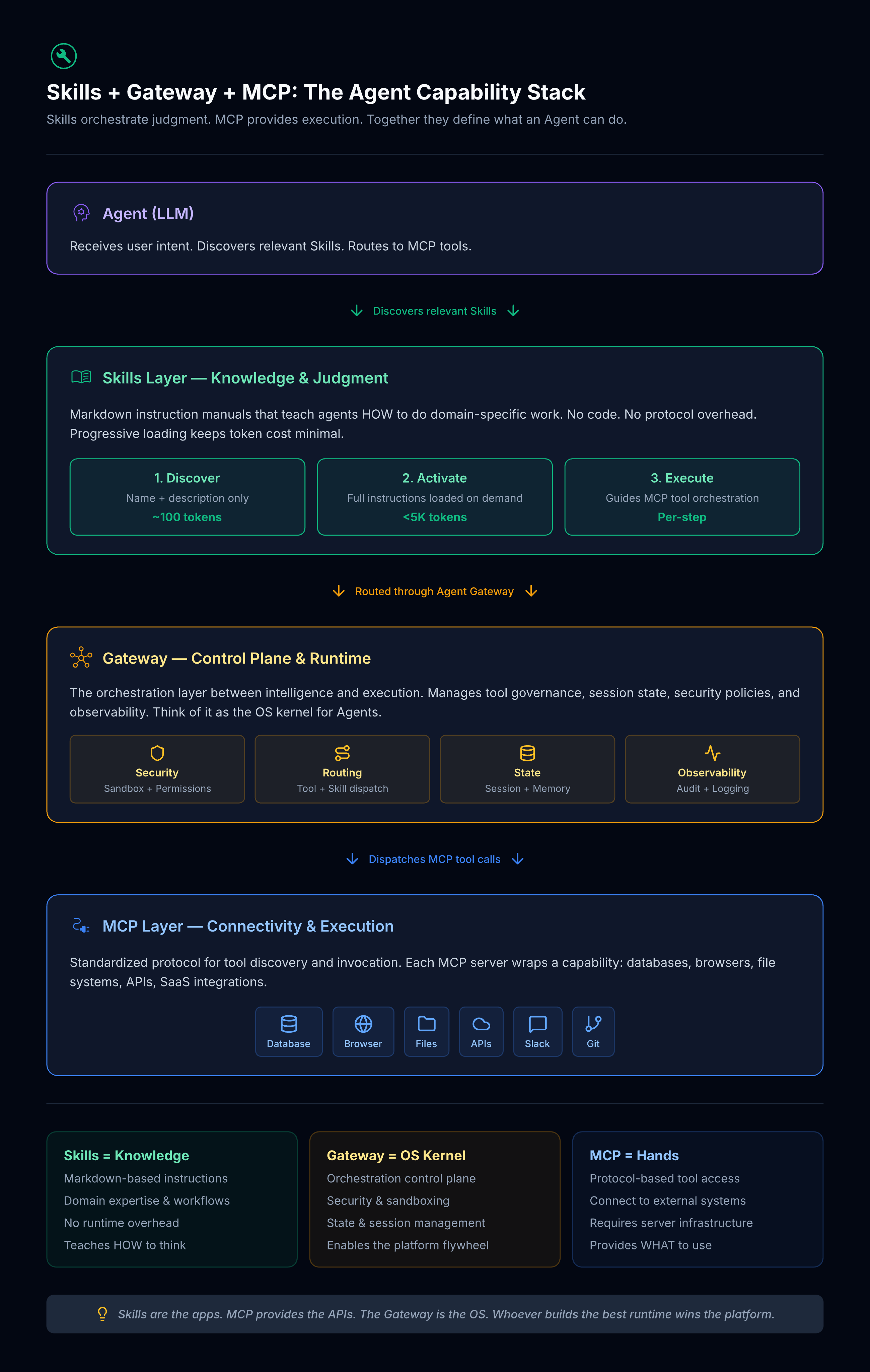
The missing layer: an Agent Gateway.
Skills define what to do. MCP provides the tools to do it with. But something has to sit in between — loading the right Skills on demand, routing MCP tool calls, enforcing security policies, managing session state, and logging everything for audit. The industry is calling this the Agent Gateway: a governance and orchestration layer purpose-built for autonomous, multi-step agent tasks.
This isn’t a new idea. TrueFoundry, Gartner, and multiple academic papers (MCP-SandboxScan for WASM sandboxing, AgentArmor for runtime trace analysis, A2AS for “HTTPS-like” agent security) all converge on the same conclusion: the Gateway is the OS kernel of the Agent world.
OpenClaw’s Gateway on localhost:18789 was a first attempt — and our previous post showed what happens when that kernel runs unprotected on your laptop. 1,100 ports exposed.
AgentPuter is building a professional, cloud-hosted Agent Gateway: sandboxed execution, declarative permission policies, persistent state, and full observability.
The killer apps: Office Skills.
Here’s where a historical parallel helps. Windows didn’t become the dominant platform because of its kernel. It won because of two categories of applications:
- Office (Excel, Word, PowerPoint) — drove enterprise adoption. Businesses had to buy Windows because that’s where Office ran.
- Gaming (DirectX, Minesweeper, Solitaire) — drove consumer adoption. People wanted Windows because that’s where the games were.
The Agent ecosystem is following the same pattern. The “kernel” (Gateway) matters, but what actually pulls users onto the platform are the killer Skills.
Right now, the vast majority of those 170,000 Skills target developers. But according to Microsoft’s 2025 Copilot Usage Report, the highest-frequency AI use cases are: work-related queries on desktop (8am–5pm dominant), health/lifestyle on mobile (all-day dominant), and entertainment on weekends.
Our bet: Office Skills are the Agent world’s “Microsoft Office” moment.
Documents, spreadsheets, presentations, emails, meeting notes — this is what most people spend their working hours on. We’re building Skills purpose-built for these scenarios:
- “Turn this quarter’s sales data into a chart” → Agent delivers a formatted Excel file
- “Transcribe yesterday’s meeting recording into notes” → Agent delivers a structured document
- “Review this contract for risk clauses” → Agent highlights and annotates them
Not “let me think about how to do this.” Instead: “Done. Take a look.”
The playbook is clear: build the runtime (Gateway), ship the killer apps (Office Skills), and let the ecosystem flywheel do the rest.
Closing Thoughts
A quick look back at this series:
In the first post, we said OpenClaw solved a real pain point — turning AI from “talks” to “acts.”
In the second, we dissected the architecture and found that Brain-Body-Soul is an elegant split, but security and reliability are critical weaknesses.
In this one, we pulled back from OpenClaw to the broader ecosystem. The picture that emerged has three layers:
Skills are the apps. MCP provides the APIs. The Gateway is the OS.
Models will keep getting cheaper. MCP tools will keep multiplying. Skills will keep growing — 170,000 and counting. But none of that matters without an orchestration layer that ties it all together securely and reliably.
Every major computing platform followed the same arc: an OS kernel that “just works,” plus killer applications that give people a reason to show up. Windows had its kernel + Office + DirectX. iOS had its kernel + the App Store + a few breakout apps. The Agent platform will have its Gateway + Skills + whatever the killer use cases turn out to be.
We’re betting that those killer use cases start with office work — the thing most knowledge workers spend the majority of their day doing. Build the Gateway right, ship the right Skills, and the flywheel starts turning.
From OpenClaw to Skills to the Agent capability stack — this three-part series traced a single thread: from a product → to its architecture → to the platform logic underneath. Next, we’ll get more concrete: how specific Skills can transform daily workflows, and what “Vibe Working” actually looks like in practice. Got a scenario you’re curious about? Let us know.