On the Eve of a Software Revolution, Your Agent Needs Its Own Computer
AI Agents are remarkably capable — but they have no home, no persistent workspace, no computer of their own. AgentPuter changes that.
1. Introduction: Software Is Being Redefined
For the past forty years, the core interaction paradigm of software has never truly changed: Humans operate software; software executes instructions.
Whether it’s the graphical interface on the 1984 Macintosh or the latest SaaS product of 2024, the underlying logic is the same — humans click buttons, fill out forms, and drag files; software faithfully carries out these actions. Software is the tool. Humans are the operators.
But in 2024–2025, things started to shift.
Anthropic’s Claude Computer Use lets AI operate a computer the way a human would. OpenAI Operator lets AI autonomously browse the web and complete tasks. Countless startups are building AI Agents, trying to get AI to do real work on behalf of humans.
A new paradigm is emerging: Agents operate software; humans give instructions.
This sounds great. But when we actually try to get agents to work for us, a fundamental problem surfaces:
Where does the Agent “live” and “work”?
It has no computer of its own, no desktop, no file system. Every time a conversation ends, it “vanishes.” Next time, it starts from scratch.
This article explores the answer to that question: Your Agent needs a computer of its own — an AgentPuter.
2. Recent Signals: The Revolution Has Already Begun
Before we discuss solutions, let’s look at what’s already happening. Three recent events clearly illustrate the landscape of this transformation.
2.1 The “Claude Crash”: When AI Eats Software
Just this week (Feb 2026), Thomson Reuters stock plunged 22% in what Wall Street is calling the “Claude Crash.”
The trigger? Anthropic’s quiet release of a legal module for Claude. The market realized that Thomson Reuters’ $650M acquisition of CoCounsel — essentially an AI wrapper around their database — was indefensible against a foundation model that could read and analyze case law directly.
This follows the collapse of Robin AI, once a legal tech darling. After raising a $26M Series B, it failed to secure follow-on funding and was listed for distressed sale in late 2025. The lesson? Users won’t pay for “AI features” sprinkled on top of legacy workflows when they can go straight to the source.
2.2 Claude Invades Excel
In October 2025, Anthropic released Claude for Excel, declaring war on Microsoft Copilot.
This was not a simple “AI assistant.” Finance professionals could talk to Claude directly in the Excel sidebar — analyzing, modifying, and even building entire workbooks from scratch. Ask a question in natural language, and Claude returns answers with cell-level references. Formula broken? Claude debugs it. Want to test a financial scenario? Describe it, and Claude builds the model.
More critically, Anthropic simultaneously connected 7 real-time market data providers — Aiera, Chronograph, Egnyte, and others. This means Claude doesn’t just operate Excel; it can directly access live financial data.
Key signal: AI is no longer content being a “helper.” It wants to enter the user’s core workflow and become the primary driver.
2.3 The Rise of OpenClaw: On-Device Personal Assistants Go Viral
In stark contrast to traditional software companies’ struggles, an open-source project has been growing explosively.
OpenClaw (formerly Clawdbot/Moltbot), a locally-run private AI assistant platform, had amassed 174K GitHub Stars and 28K+ Forks by early 2026 — gaining 145K+ stars with 2 million visitors in its first week alone. CNBC described it as “generating buzz and fear globally.”
What is OpenClaw? Put simply, it lets you run a private AI assistant on your own hardware — Mac mini, Linux server, Raspberry Pi, or even a VPS. You send it messages via Telegram, WhatsApp, Discord, or iMessage, and it executes real tasks — not chatting, but actually getting things done.
What can it do?
- Manage finances: Auto-categorize transactions using
hledger. - Track tasks: Sync Linear issues with personal todos.
- Server ops: Manage NixOS configs via SSH.
- Media: Auto-request movies on Jellyseerr.
Users create custom Skills — simple Markdown files — that teach the agent how to use new tools.
Key signal: Users don’t need “better software.” They need an agent that does the work for them. OpenClaw proved it — and it’s open source, running on the user’s own hardware.
3. A Brief History: Three Eras of Software
To understand what AgentPuter means, we need to revisit the evolution of software.
3.1 The Local Software Era (1980s–2000s)
Software installed locally. Data stored locally.
You bought a CD, installed Microsoft Office on your PC. Documents lived on your hard drive — switch to another computer and you couldn’t access them. Software was a “product.” You paid once, you owned it.
Representatives: Microsoft Office, Adobe Photoshop, AutoCAD.
Defining trait: Powerful but isolated. Your data was locked inside a single machine.
3.2 The Cloud SaaS Era (2000s–2020s)
Software ran in the cloud. The browser was the gateway.
No installation needed — just open a browser. Data lived on servers; switch computers and everything was still there. Software became a “service.” You paid monthly; it was always available.
Representatives: Google Docs, Figma, Notion, Slack.
Defining trait: Convenient but network-dependent. Your data lived on someone else’s servers.
3.3 The AI-Native Era (2020s–?)
Software designed for AI. The Agent is the primary user.
This is the era we are entering. Software is no longer just a tool waiting for human operation — it’s a capability that agents can invoke directly. Humans shift from “operators” to “commanders.”
The defining product of this era is… ?
That’s exactly the question AgentPuter aims to answer.
4. The Agent’s Dilemma: Capable, but Homeless
Today’s AI Agents are remarkably capable.
4.1 What Can Agents Do?
- Understand natural language instructions: Tell it what to do in plain language, and it understands.
- Decompose complex tasks: Given a big task, it breaks it into smaller steps and executes them one by one.
- Use tools to get work done: Search the web, read/write files, call APIs, operate software.
- Make autonomous decisions and self-correct: When it hits a problem, it finds a way around it without hand-holding.
In terms of raw capability, an agent can already function as a junior employee. But here’s the problem —
4.2 What Are Agents Missing?
No “body.” Agents can only interact with software through APIs or screenshots. They have no mouse, no keyboard, no display of their own. To operate a piece of software, either the software offers an API (most don’t), or the agent has to take a screenshot, analyze it, decide where to click, execute the click, take another screenshot… A single action takes seconds. And it’s fragile — the slightest UI change can cause a misclick.
No “home.” Every conversation starts from zero. The files it organized for you last time? Gone. The research report it was halfway through? Lost. Agents have no persistent environment — no “desktop,” no “folders.”
No “workbench.” Existing software is designed for humans — beautiful UIs, complex interactions, rich visual feedback. But agents don’t need any of that. They need clean interfaces, stable state, and predictable behavior. What’s “user-friendly” for a human and what’s “user-friendly” for an agent are two very different things.
4.3 The Awkward Status Quo
Current mainstream solutions all have obvious limitations:
Computer Use (screenshot + click): Let the agent see the screen and click the mouse, just like a human. Sounds universal, but it’s extremely inefficient — capture a screenshot, analyze it, decide where to click, execute the click, capture another screenshot to see the result… A simple action takes multiple seconds. And it’s error-prone — any slight UI change can cause mistakes.
MCP / Function Calling: Give the agent an API to call. Efficient, but limited in coverage — it only works if the software vendor provides an interface. Most don’t, or the interface is too constrained.
Plugin model: The agent exists as a “plugin” inside the software. But then the agent is a “guest” and the software is the “host.” What the agent can do is entirely at the software’s mercy.
The common problem across all these approaches: The agent is always living under someone else’s roof. It has no territory of its own, no sovereignty.
5. AgentPuter: A Dedicated Computer for Your Agent
If the Agent needs a home, let’s build it one.
5.1 What Is AgentPuter?
AgentPuter is a computing environment designed for agents.
In this environment, the Agent is a first-class citizen. Software, files, and interfaces are all designed for the agent. Humans are observers and commanders — you tell the agent what to do, watch it work, and intervene when necessary.
This is not about simulating human operations (like Computer Use). It’s about natively supporting agent operations. The agent doesn’t need to “look at a screen” because there’s no screen. It doesn’t need to “click a mouse” because it calls interfaces directly.
5.2 Core Philosophy
| Traditional Software | AgentPuter |
|---|---|
| UI designed for humans | API designed for agents + UI for human observation |
| Humans click to operate | Agents call interfaces directly |
| Files stored locally or in the cloud | Files in the agent’s dedicated workspace |
| One-off conversations | Persistent agent workspace |
In one sentence: Traditional software is a tool for humans. AgentPuter is a computer for agents.
5.3 Core Value Propositions
AgentPuter is more than a feature list. It plays five key roles in the value chain:
1. Privacy Proxy (The Firewall) This is AgentPuter’s most important value to users. You wouldn’t paste your banking credentials into ChatGPT, but you can trust a locally-running AgentPuter. It acts as a middleware between the user and LLMs — sanitizing data, managing authorization, and ensuring data ownership stays in the user’s hands.
2. Context Manager (The Memory) LLMs are amnesic; AgentPuter has a long memory. It converts your long-running workflows, personal preferences, and file history into structured long-term memory. When interacting with an LLM, it extracts only the context relevant to the current task — saving expensive token costs while improving accuracy.
3. Unified Interface (The Adaptor) Every capability in AgentPuter — from document processing to email — is wrapped as a standardized Tool that agents can invoke natively. It abstracts away the complexity of underlying APIs, letting agents call capabilities as naturally as a human uses a mouse.
4. Persistent Workspace (The Desk) The agent has its own “desktop.” Half-finished files, collected research materials, intermediate work products — everything is saved. Next session picks up where the last one left off.
5. Accountability Black Box (The Log) Humans can see what the agent is doing at any time. AgentPuter logs every decision chain and operation. When the agent performs a sensitive action (e.g., deleting a file, sending money), the system automatically pauses and requests human confirmation (Human-in-the-loop).
5.4 Lessons from OpenClaw
OpenClaw’s explosion validates the AgentPuter thesis. But it also reveals gaps — exactly where AgentPuter can do better:
| What OpenClaw Achieved | Where AgentPuter Goes Further |
|---|---|
| Runs locally, privacy-preserving | Also local-first, but easier to deploy (no technical background required) |
| Custom Skills via Markdown files | Richer skills marketplace with visual orchestration |
| Triggered via messaging apps | Multi-entry: messaging, voice, desktop app, shortcuts |
| Developer-friendly | Accessible to non-technical users |
| Single agent | Multi-agent collaboration |
OpenClaw proved the demand exists. AgentPuter’s mission is to make this capability accessible to everyone.
6. Use Cases
AgentPuter is not an abstraction. Here’s what it looks like in practice.
6.1 Office Work
Traditional: You open Word to write a document, Excel to make a spreadsheet, Outlook to send email. Every application requires your hands-on operation.
Claude Excel approach: You use an AI assistant inside Excel to analyze data. But everything else? Still manual.
AgentPuter approach: You tell the agent: “Compile last week’s sales data into a report and send it to my manager.” The agent pulls the data, runs analysis, writes the report, formats it, and sends the email. You just review the final output.
The difference: Claude Excel is “AI entering software.” AgentPuter is “software designed around the agent.” The former is an enhancement; the latter is a paradigm shift.
6.2 Research
Traditional: Open dozens of browser tabs, copy-paste into a note-taking app, organize and synthesize manually.
AgentPuter approach: You say “Research 2025 EV market trends.” The agent searches autonomously, reads articles, extracts key points, and produces a report. It has its own “research notebook” — both the process and the results are saved, ready for follow-up.
6.3 Development
Traditional: You write code, run tests, fix bugs, deploy. Every step requires your attention.
AgentPuter approach: The agent has its own dev environment and code repository. You describe the requirements; it writes code, runs tests, and fixes bugs. It asks you when it gets stuck, but handles most of the work independently.
6.4 Creative Work
Traditional: Drag and drop in Figma, adjust layers in Photoshop, pixel by pixel.
AgentPuter approach: The agent has its own “canvas” and “asset library.” You describe the desired outcome; it generates a first draft, iterates, and saves versions. You act as the creative director; the agent acts as the designer.
7. AgentPuter vs. Existing Approaches
| Dimension | Computer Use | MCP / Plugins | Claude Excel | OpenClaw | AgentPuter |
|---|---|---|---|---|---|
| Interaction | Screenshot + click | API calls | Sidebar chat | Message trigger | Native agent interface |
| Efficiency | Low | Medium | Medium-high | High | High |
| Persistence | None | Limited | Limited | Yes (local) | Full workspace |
| Human visibility | Visible but hard to understand | Not visible | Visible | Partially visible | Visible and understandable |
| Coverage | Theoretically universal | Vendor-dependent | Excel only | Extensible via Skills | Purpose-built for agents |
| Deployment | Cloud | Cloud | Cloud | On-device | Local-first |
| User barrier | Low | Medium | Low | High (technical) | Low |
Summary:
- Computer Use is the universal but inefficient fallback
- MCP / Plugins depend on vendors opening up, with limited coverage
- Claude Excel is a powerful single-point breakthrough, but Excel-only
- OpenClaw has the right direction, but the barrier to entry is too high
- AgentPuter combines OpenClaw’s philosophy with the goal of accessibility
8. Technical Architecture
8.1 Overall Architecture: The Value Chain Hub
AgentPuter’s architecture is not just a layered design — it’s middleware connecting fuzzy human intent to deterministic digital output. It abstracts away complex API and environment details downward, and presents simple, natural interaction interfaces upward.
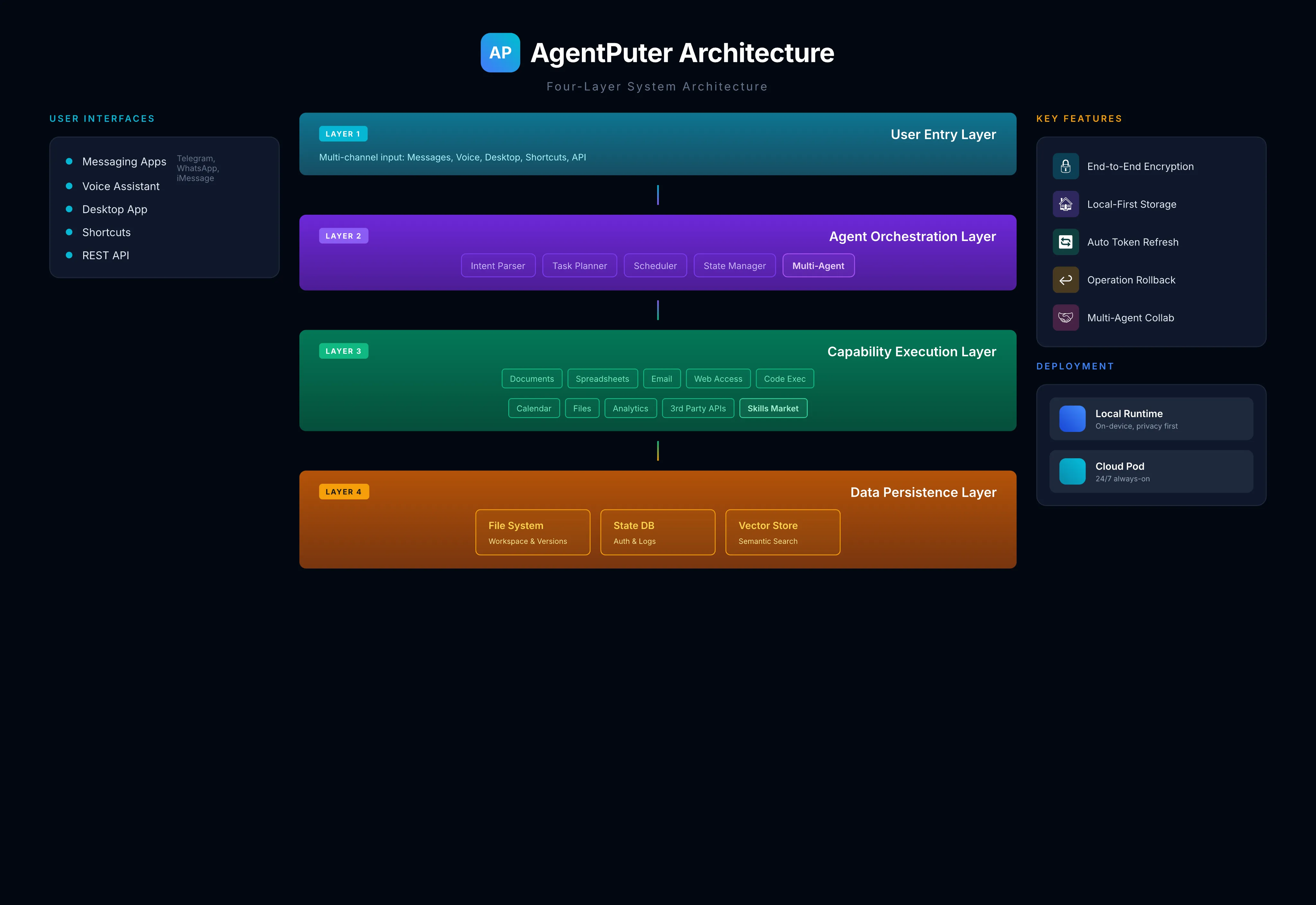
User Entry Layer: Supports multiple ways to trigger your agent — messaging apps (Telegram, WhatsApp, iMessage), voice assistants, desktop applications, system shortcuts, and direct API calls.
Orchestration Layer: The “brain” of AgentPuter. After receiving user intent, it plans the task, decomposes it into executable steps, dispatches capability modules, and manages overall state.
Execution Layer: Concrete capability modules including document processing, spreadsheets, email, web access, code execution, calendar management, file operations, and third-party APIs. Also supports a Skills Market.
Persistence Layer: The agent’s “memory” — file system, state database, and vector store. All encrypted and local-first.
8.2 Auth Persistence System
The key to solving the “re-authorize every time you restart” problem.
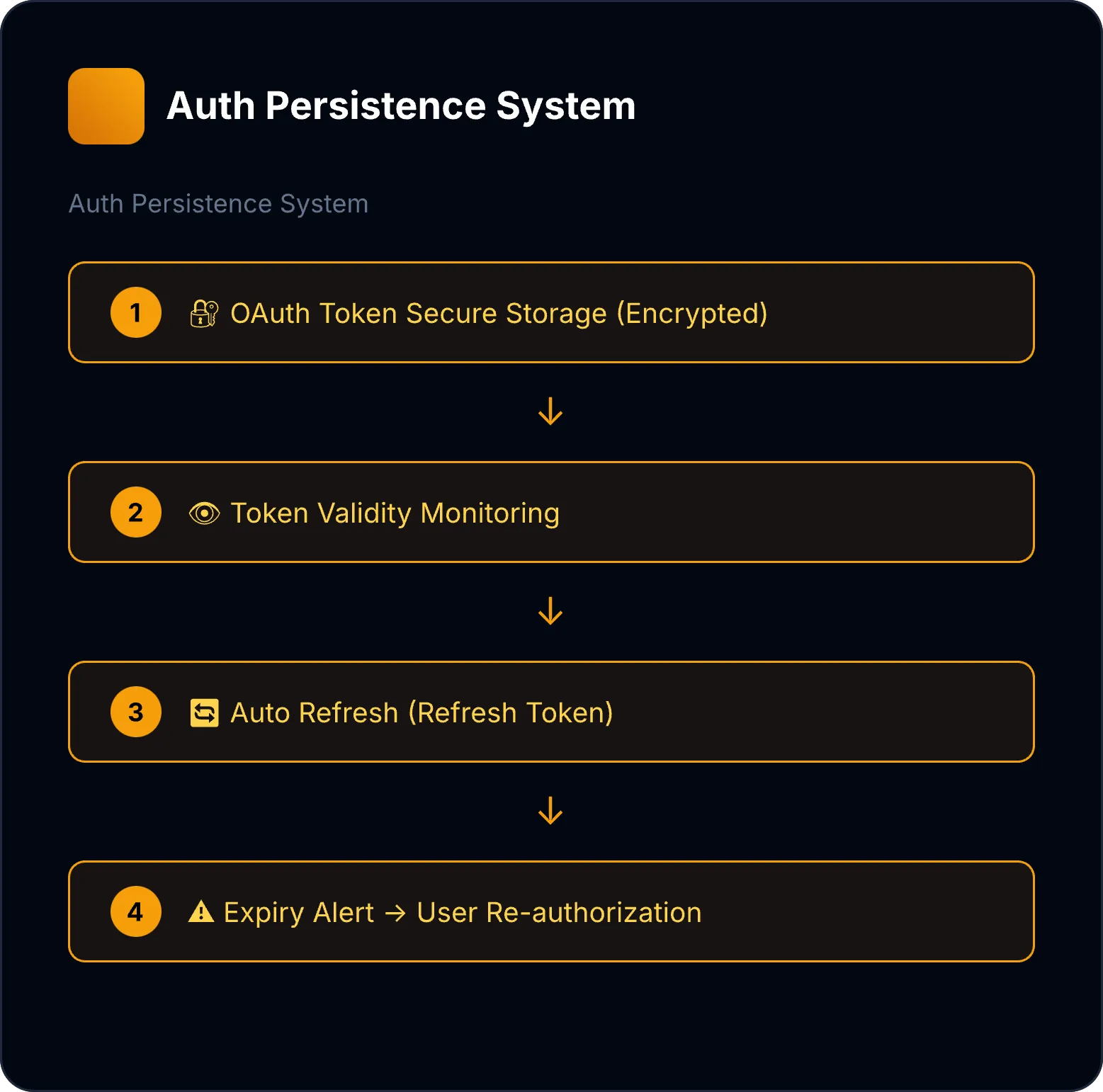
- Secure storage: All credentials stored encrypted, never in plaintext
- Auto-renewal: Supports OAuth 2.0 Refresh Token mechanism; tokens refreshed automatically before expiry
- Health checks: Periodically verifies auth status, notifies user of issues proactively
- Least privilege: Requests only the permissions required for the task
8.3 Document Structure Understanding Engine
Lets agents truly “understand” documents — not just treat them as raw text.
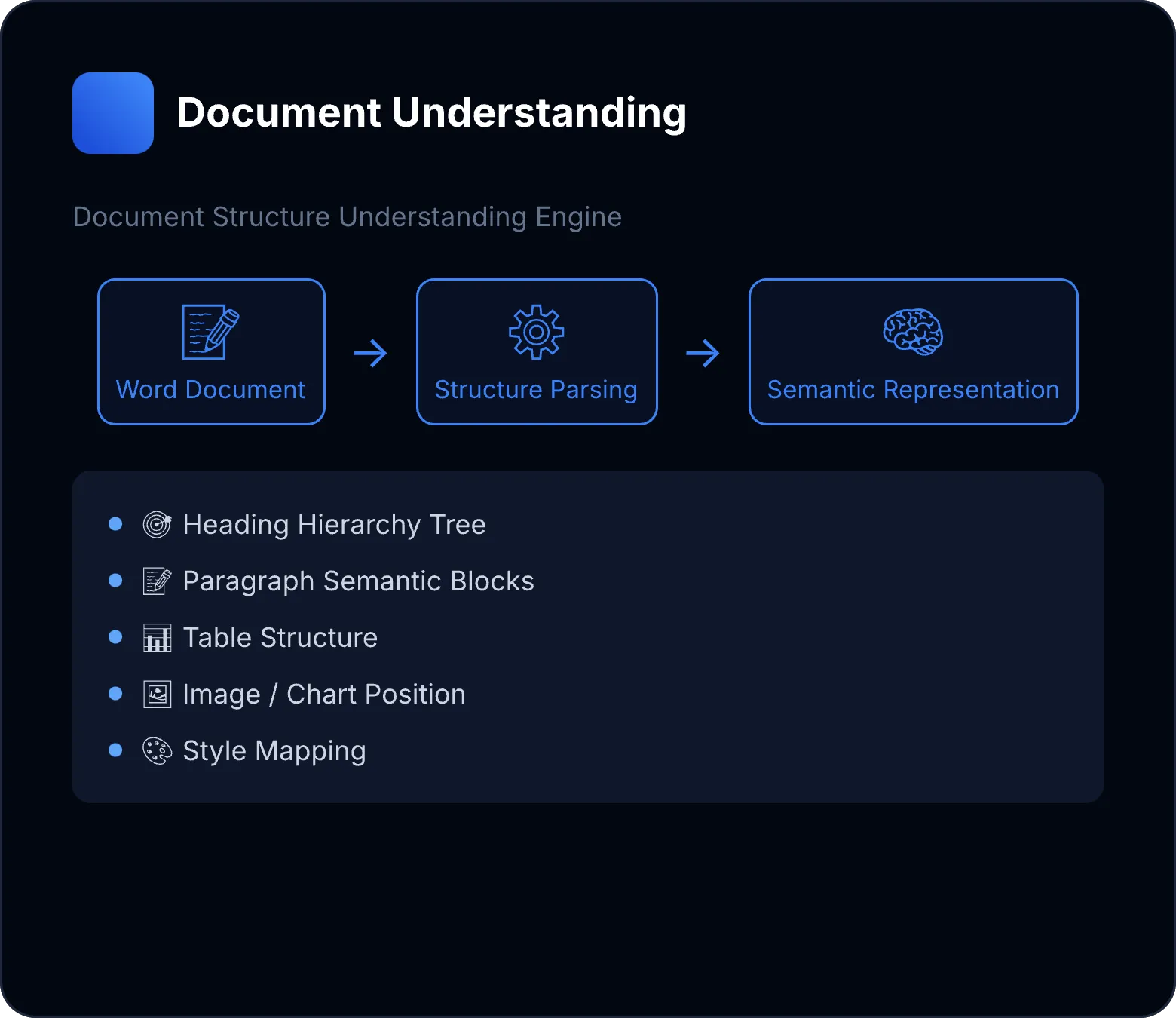
- Structural parsing: Recognizes heading hierarchy, paragraph boundaries, list structures
- Table understanding: Identifies headers, data rows, and merged cells
- Style awareness: Understands semantic styles like “Heading 1,” “Body,” and “Quote”
- Incremental editing: Modifies documents while preserving original formatting and structure
8.4 Operation Rollback System
Ensures agent operations are reversible — users can always “undo.”
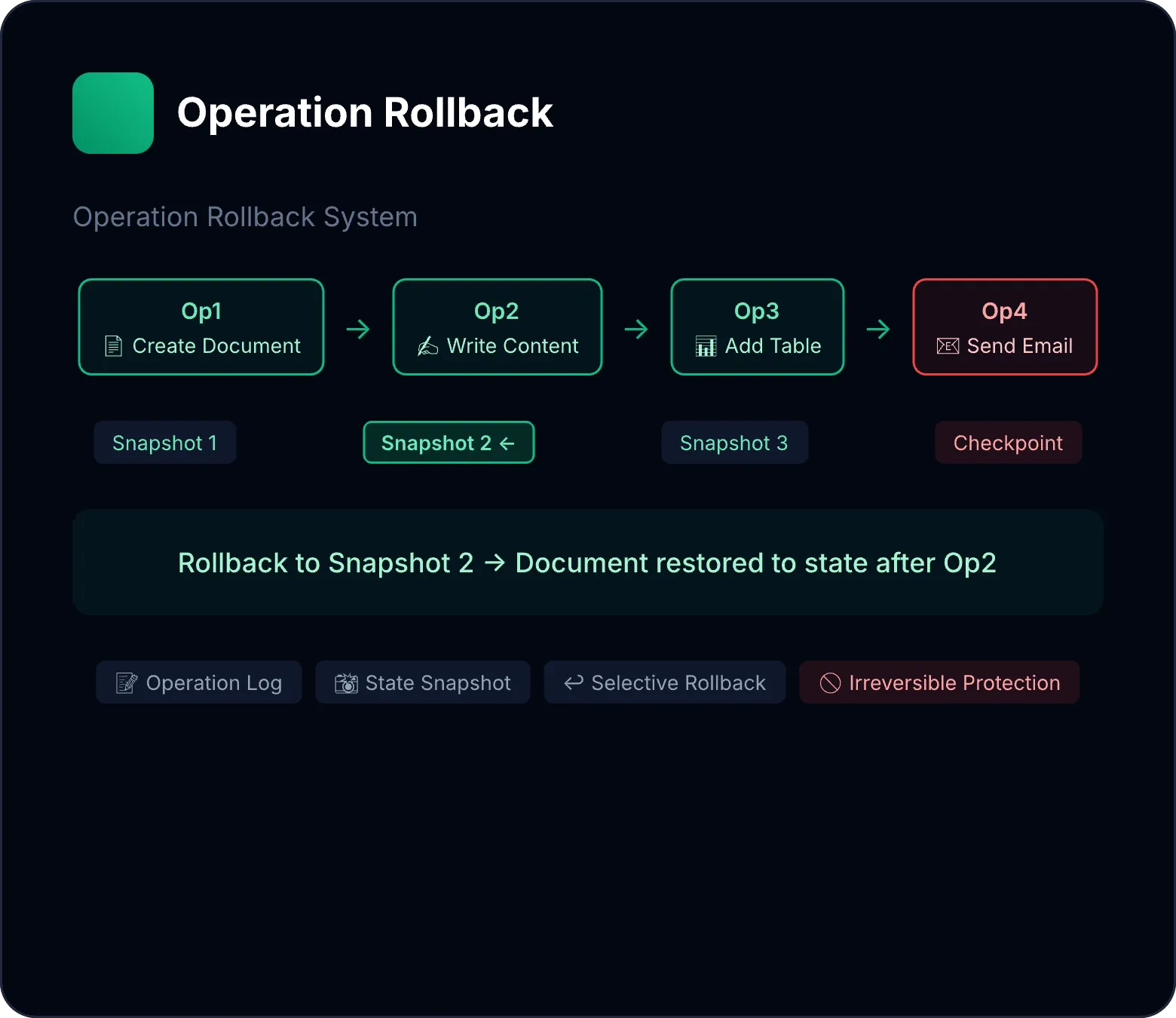
- Operation log: Records detailed info for every action
- State snapshots: Saves full state snapshots at key checkpoints
- Selective rollback: Can roll back to any historical state
- Irreversible action protection: Actions like sending emails or API calls require confirmation
8.5 Multi-Agent Collaboration Framework
Supports multiple agents collaborating within the same workspace on complex tasks.
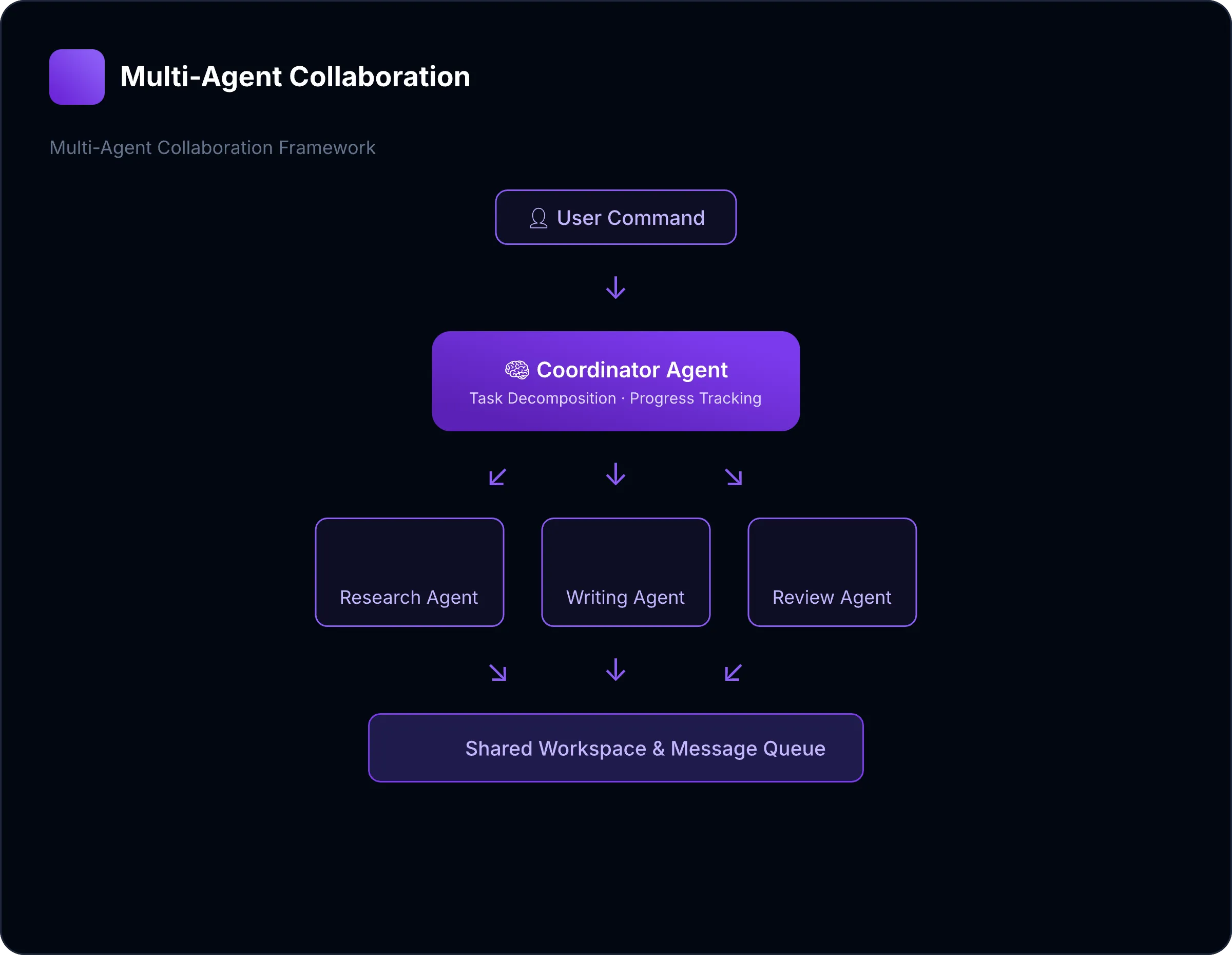
- Role specialization: Different agents handle different task types
- Shared context: Intermediate results passed through a shared workspace
- Message-based communication: Agents coordinate via message queues
- Conflict resolution: Locking and merging mechanisms when multiple agents modify the same resource
8.6 Deployment: Local-First + Cloud Optional
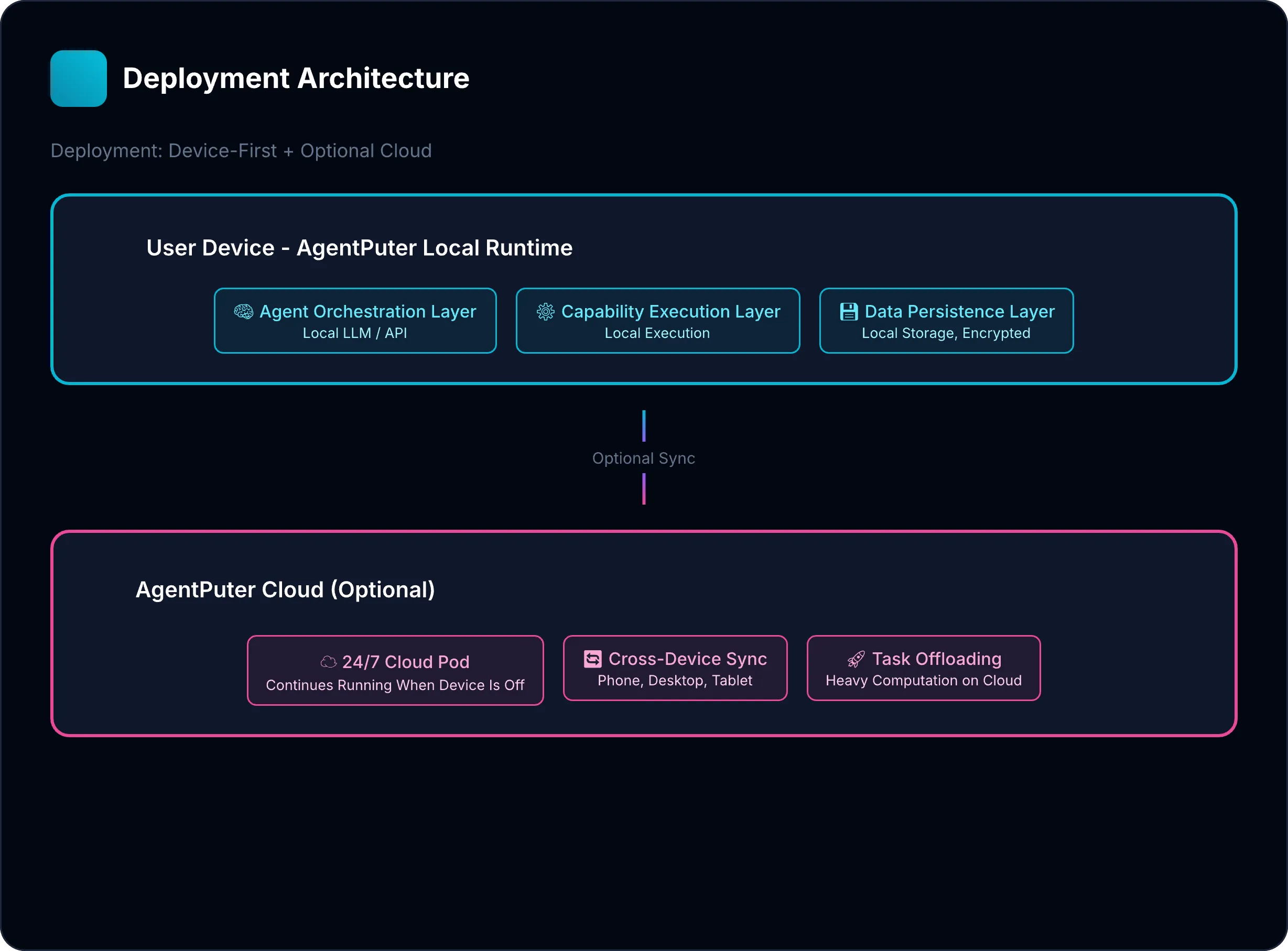
Local-first: By default, AgentPuter runs locally on the user’s device. Data never leaves the user’s control.
Cloud optional: Users can enable a Cloud Pod for 24/7 operation, cross-device sync, and heavy computation offloading.
9. Looking Ahead: The Future Shape of Software
Everyone will have their own team of agents. Not one agent — many. Some excel at writing, others at data analysis, still others at design. They collaborate inside your AgentPuter, handling all kinds of tasks.
Software becomes the agent’s “skill.” Office is no longer an application you use — it’s a capability your agent possesses. “My agent knows Excel” — as natural as “my employee knows Excel.”
Humans shift from operators to commanders. You no longer need to know how to write a VLOOKUP in Excel. You just need to know what result you want.
Users don’t need “better office software.” They need an agent that can complete their work — and that agent needs a computer of its own.
Our mission: Give everyone their own AgentPuter, so AI Agents can truly work 24/7 on your behalf.
10. Conclusion: From Operator to Commander
On the eve of the software revolution, the biggest opportunity is redefining human-computer interaction.
In the PC era, humans were Operators. We were the CPU. When we got tired, work stopped. In the AI era, humans should be Commanders. Agents are the digital workforce. AgentPuter is the 24/7 factory.
AgentPuter is not just a product name. It’s a new mental model:
Human (CEO) → AgentPuter (Digital Factory) → Work Product (Delivery)
The legal tech stock collapse. Claude’s invasion of Excel. OpenClaw’s explosion. These three events tell us: the revolution has begun. Your agent deserves a computer of its own.
References & Further Reading
- Anthropic rolls out Claude AI for finance, integrates with Excel (VentureBeat, Oct 2025)
- Is the Collapse of Robin.AI a Sign of a Legal Tech AI Bubble? (GeekLawBlog, Nov 2025)
- From Clawdbot to OpenClaw: Meet the AI agent generating buzz and fear globally (CNBC, Feb 2026)
- Thomson Reuters shares fall 30%+ amid AI product questions (Business Insider, Nov 2025)